 EU
EU
(Die Abbildungen müssen nicht den tatsächlichen Produkten entsprechen)

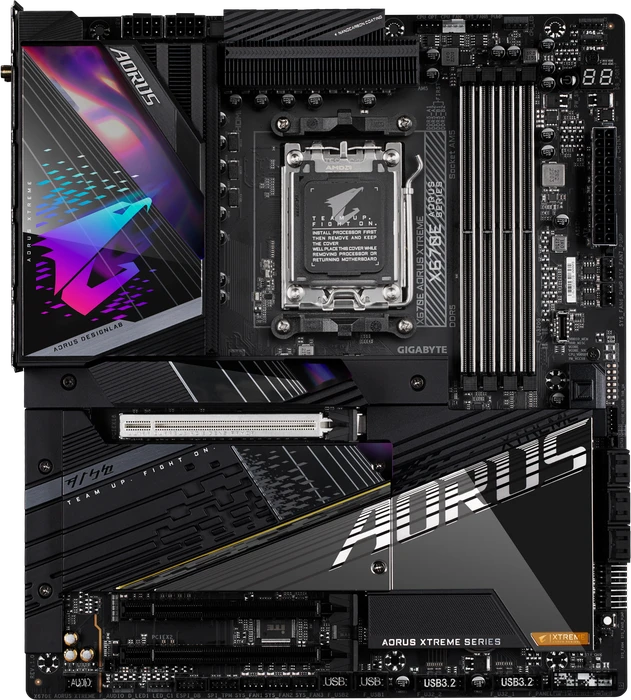


GIGABYTE X670E
- Sockel
- AMD AM5
- Chipsatz
- AMD X670E
- RAM
- 4x DDR5 DIMM-Slots, Dual Channel, max. 256GB UDIMM Non-ECC
- RAM-Datenrate
- DDR5-5200 (Ryzen 7000/Ryzen 8000G), DDR5-5600 (Ryzen 9000), max. DDR5-8000 OC
- ECC-Unterstützung
- nein
- Anschlüsse intern - USB
- 1x USB 3.2 Header Key-A (20Gb/s, 1x USB-C), 2x USB 3.0 Header 20-Pin (5Gb/s, 4x USB-A), 2x USB 2.0 Header 9-Pin (480Mb/s, 4x USB-A)
- Anschlüsse intern - Stromversorgung
- 1x 24-Pin ATX, 2x 8-Pin EPS12V
- Grafik
- iGPU
- RAID-Level
- 0/1/10 (X670E)
- BIOS
- 1x 32MB (256Mb)
- Garantie
- 3 Jahre ( Info )
- USB-Schreibweise
- Link
198 Bewertungen für GIGABYTE X670E
Teilen Sie uns Ihre Meinung zu GIGABYTE X670E mit oder lesen Sie die Bewertungen unserer Mitglieder, Experten und anderer Websites zu dessen Varianten.Laden ...
-
 tomshardware.com: Gigabyte X670E Aorus Pro X motherboard review: Striking in white, with lots of USB (translate)Originalwertung: 4/5
Gigabyte’s X670E Aorus Pro X has almost everything you’re likely to want from the X670E platform. You get two PCIe 5.0 M.2 sockets, integrated Wi-Fi 7, 12 USB ports on the rear IO, and more. So long as getting the highest-quality audio codec isn’t one of your primary concerns, the Aorus Pro X should be on your motherboard shortlist.
-
tweaktown.com: GIGABYTE X670E AORUS Xtreme Motherboard Review (translate)Originalwertung: 93/100
GIGABYTE's X670E AORUS Xtreme is an enthusiast-class motherboard that won't break the bank!
-
eteknix.com: Gigabyte X670E AORUS EXTREME Motherboard Review (translate)
When it comes to getting the best performance out of the latest and greatest hardware, you’re going to want a pretty decent motherboard. Amazingly, these days, you can actually get close to flagship performance from your CPU and GPU on surprisingly affordable motherboards, at least compared to the terrifying prices of the flagship motherboards. Of course, you’re not paying a lot more just for a little extra CPU performance, it certainly goes a lot deep than that. The Gigabyte X670E AORUS EXTREME is an absolute beast and features some of the most robust connectivity and build quality you’ll ever find on a motherboard.
-
tomshardware.com: Battle of the X670E Flagships: Testing MSI, Asus and Gigabyte’s Best (translate)
Three flagship-class X670E boards go head to head to see who reigns supreme!
-
tomshardware.com: Gigabyte X670E Aorus Master Review: Fully Equipped, Under $500 (translate)Originalwertung: 4/5
Gigabyte’s X670E Aorus Master is a well-equipped, capable and power-efficient motherboard for $499.99. You get two PCIe 5.0 M.2 sockets, 12 rear USB ports and robust power delivery. So long as you don’t need 40 Gbps USB and the latest and greatest audio codec, it’s a great sub-$500 option for Zen 4.
-

-
-
-
overclock3d.net: Gigabyte X670E Aorus Master Review (translate)
However, we're not foolish enough to believe that any of us have a laser focus on performance with no other considerations even entering our minds. We've all got brands we like, even if only to keep our software control packages to a minimum, or to leave a single brand shining out throught the RGB lighting. Similarly some of us want systems that are good for the foreseeable future, or we have a ton of peripherals we need USB ports to manage, or enormous digital collections that push storage capacity to the extremes. Or maybe you just like having a model in the upper reaches of a manufacturers range as they tend to be the ones that receive the quickest driver and BIOS updates. Whatever camp you fall into, it's clear from sales figures alone that we all have wide ranging desires.
-
tweaktown.com: Gigabyte X670E AORUS Master Motherboard Review (translate)
While X670E is just pushing into the market, the AORUS Master is one of the better boards we have tested for this new platform.
-
techpowerup.com: Gigabyte X670E AORUS Master Review (translate)
First, let's discuss an easy to understand topic, but quite complicated in the technical aspect, and that is the motherboards BIOS. While this Gigabyte X670E AORUS Master review comes a few weeks after AMD Ryzen 7000 series launch, multiple BIOS revisions have occurred in the meantime, solving some of the early issues and strengthening memory compatibility. There are still a number of system memory restrictions and minor performance bugs that will take many more months or possibly even up until the next CPU cycle to fully resolve. While the BIOS for this Gigabyte X670E AORUS Master is fairly flushed out, with all the features you expect from a product of this tier, memory support is still a concern. It is not to say that this motherboard cannot handle higher memory frequencies, rather the design of these AMD CPUs, combined with its current AGESA revision dictates the overall compatibility. From a distance, in a lot of ways this is reminiscent of the early days of AMD Ryzen, where if the system memory in question that wasn't on the motherboards QVL list, it simply refuses to work. Higher speed memory that was commonly used on Intel platforms at the time did not work at all, and often four memory DIMMs did not work either. It wasn't until the second generation of the Ryzen CPUs did many of these initial memory restrictions become less of a issue. DDR5 is new to AMD. For an example of the strangeness going on here, one the of two Netac Shadow II DDR5-4800 kits refused to boot. It was narrowed down to one of the DIMMs. Though, this gives little indication to what the issue could be, as it works fine on the Intel Z690 platform. Just like Intel last year, AMD is going through the teething process. Unfortunately, that means the end users (you) are the early adopters, because DDR5 is the only supported memory type on this AM5 platform.

- Serienübergreifende Testberichte
-
Alle Angaben ohne Gewähr. Die gelisteten Angebote sind keine verbindlichen Werbeaussagen der Anbieter.
* Preise in Euro inkl. MwSt. zzgl. Versandkosten. Bei der Auswahl von "inkl. Versand" beinhaltet der dargestellte Preis die Kosten für den Versand. Die nicht angeführten Kosten in andere Länder entnimm bitte der Website des Händlers. Bei Sortierung nach einer anderen als der Landeswährung des Händlers basiert die Währungsumrechnung auf einem von uns ermittelten Tageskurs, der womöglich nicht mit dem im Shop angegebenen Preis exakt übereinstimmt. Bitte bedenke außerdem, dass die angeführten Preise periodisch erzeugte Momentaufnahmen darstellen und technisch bedingt teilweise veraltet sein können. Insbesondere sind Preiserhöhungen zwischen dem Zeitpunkt der Preisübernahme durch uns und dem späteren Besuch dieser Website möglich. Händler haben keine Möglichkeit die Darstellung der Preise direkt zu beeinflussen und sofortige Änderungen auf unserer Seite zu veranlassen. Der maßgebliche Preis für den Verkauf durch den Händler ist der tatsächliche Preis des Produkts, der zum Zeitpunkt des Kaufs auf der Website des Händlers steht.